IP Changed? Fix FreePBX Trunk Unreachable
 If you have an IP change on your Internet connection for whatever reason, drop outs, or your broadband fails and you failed-over to your 4G or 5G backup, Asterisk (the underlying engine for FreePBX) still uses your previous IP, and because of that, calls fail, inbound recovers, but not so with outbound.
The IP change affects inbound calls only briefly, they fail because your VSP (Voice Service Provider) is still sending inbound calls to your old IP, since that's where the VSP knows to send them from your last REGISTER, luckily, trunks automatically re-register every few minutes or so, three minutes (the recommended period for expiry) is a good choice, so once it sends a new REGISTER, the VSP knows your new IP and sends your inbound calls to the trunk on that new IP, and you can receive calls again.
However, the VSP also expects all outbound calls from that same new IP, but because of how Asterisk works, your outbound calls are still failing, this is a result of using a setting that doesn't bother multi-homed networks that use BGP to deal with any failovers, but for everybody else, especially those using NAT, that setting causes issues, NAT uses two different pathways, one mapping for inbound, and a separate mapping for outbound, and that's where the problem is.
Asterisk receives INVITE requests from your VSP for all inbound calls based on the information in the trunk registration, as I alluded to above, that same registration tells your VSP where your calls will come from too for outbound calls, but Asterisk sends OPTIONS requests, like pings, for checking the availability of trunks for outbound calls, when it does not get a reply to the OPTIONS requests, it marks the trunk as unreachable and no longer tries to send any outbound calls on the trunk, and after cycling through all trunks if you have more than one, you get Allison telling you all circuits are busy now, that is until the OPTIONS packets get a response, so even though your VSP knows your new IP and is still there, working, waiting for you, Asterisk, and how it uses NAT is still using your old IP preventing the calls from proceeding, yes Asterisk, not your VSP, so Asterisk is the failure point here, which is why your phone still rings when someone calls you, but frustratingly you can't call out.
This is all because of one setting nearly everyone uses...
A lot of installations use two or more trunks, not only for
To resolve the problem, we take the OPTIONS ping requests out of the equation, we can have Asterisk not send, therefore not use, OPTIONS in determining the active status of a trunk for outbound calls, the very simple fix is to set, under pjsip/advanced settings for each trunk...
Just make sure your registration expiry (trunk->pjsip->Advanced) value is small, 180 seconds (3 minutes) is a good value, you really shouldn't be using anything more, but beware setting this value too low, you just might piss off the VSP's or their automated DoS checks.
Remember, OPTIONS failing does not mean the trunk has failed, just that it got no response to that ping-like packet, this can also happen if your VSP's network is under high load and drops OPTIONS packets, a lot of VSP's around the globe do not give these packets high priority.
To test your system is registered, ssh into your PBX and execute
Now check your endpoints, the trunks are usually the last displayed, due to the length of my output I'll just display one of the trunks

In this entry we see Unknown and under TTL nan (as underlined), this is normal using this configuration and what we expect to see because Asterisk gets that status and response time from OPTIONS requests, once implementing this change, you shouldn't have much to worry about if your router has to deal with an outage and switches to the mobile network.
However, the VSP also expects all outbound calls from that same new IP, but because of how Asterisk works, your outbound calls are still failing, this is a result of using a setting that doesn't bother multi-homed networks that use BGP to deal with any failovers, but for everybody else, especially those using NAT, that setting causes issues, NAT uses two different pathways, one mapping for inbound, and a separate mapping for outbound, and that's where the problem is.
Asterisk receives INVITE requests from your VSP for all inbound calls based on the information in the trunk registration, as I alluded to above, that same registration tells your VSP where your calls will come from too for outbound calls, but Asterisk sends OPTIONS requests, like pings, for checking the availability of trunks for outbound calls, when it does not get a reply to the OPTIONS requests, it marks the trunk as unreachable and no longer tries to send any outbound calls on the trunk, and after cycling through all trunks if you have more than one, you get Allison telling you all circuits are busy now, that is until the OPTIONS packets get a response, so even though your VSP knows your new IP and is still there, working, waiting for you, Asterisk, and how it uses NAT is still using your old IP preventing the calls from proceeding, yes Asterisk, not your VSP, so Asterisk is the failure point here, which is why your phone still rings when someone calls you, but frustratingly you can't call out.
This is all because of one setting nearly everyone uses...
qualify_frequency = 30This, and any value other than 0 (zero), tells Asterisk to use and send OPTIONS ping requests every 30 seconds to your VSP on that trunk, this causes the failures of outbound calls because the NAT mappings are no longer valid, different sources, ports, etc. To think of it another way, Asterisk is caching old network data and doesn't refresh automatically. FreePBX has an obscure setting to check and refresh your external IP, but that's of no use if you have no access because you're on holidays, or tucked up in your nice warm bed in the middle of a cold winters night, or your internet connection is flaky reconnecting every five minutes, it just shouldn't ever require manual intervention, period!
A lot of installations use two or more trunks, not only for
least cost routingLeast Cost Routing, or LCR, is a process that PBX operators use to select an upstream VSP's trunk to use based on cost, this can be time of day or permanent. EG: Your main VSP ABC might be cheaper for local and national calls, but a secondary VSP, XYZ, might be half the cost for mobile call rates than ABC's, but more expensive for national calls, so you direct all mobile calls out XYZ's trunk, but leave national and local calls going out ABC's trunk.
, but for backup in case the preferred (default) trunk really fails, that's no good either if Asterisk still thinks you're on that old IP address, multiple trunks can't help you if your IP address has changed because your DSL died and you're now on 4G, all trunks will have the same issue.To resolve the problem, we take the OPTIONS ping requests out of the equation, we can have Asterisk not send, therefore not use, OPTIONS in determining the active status of a trunk for outbound calls, the very simple fix is to set, under pjsip/advanced settings for each trunk...
qualify_frequency = 0Now when you dial out, Asterisk will check if it has a valid registration on the trunk (from REGISTER for inbound calls), if it does, it will permit and send outbound calls via an outbound INVITE to the VSP, if the trunk is really down for any reason, and your registration failed, it simply skips that trunk and tries the next trunk in the outbound route order to send the call to. As for the outbound routes secondary backup trunks, this still works because if Asterisk, when sending the outbound INVITE on the first trunk gets a SIP error or a timeout, it will immediately try the next trunk, and so on.
Just make sure your registration expiry (trunk->pjsip->Advanced) value is small, 180 seconds (3 minutes) is a good value, you really shouldn't be using anything more, but beware setting this value too low, you just might piss off the VSP's or their automated DoS checks.
Expiration 180
Remember, OPTIONS failing does not mean the trunk has failed, just that it got no response to that ping-like packet, this can also happen if your VSP's network is under high load and drops OPTIONS packets, a lot of VSP's around the globe do not give these packets high priority.
To test your system is registered, ssh into your PBX and execute
~$ asterisk -rvvv
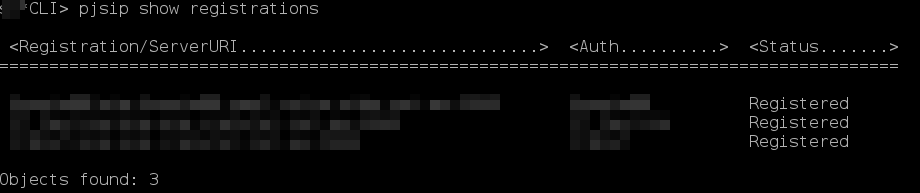
CLI> pjsip show registrations
You should see your trunks status, in this example my three trunks are all registered...
Now check your endpoints, the trunks are usually the last displayed, due to the length of my output I'll just display one of the trunks
CLI> pjsip show endpoints
In this entry we see Unknown and under TTL nan (as underlined), this is normal using this configuration and what we expect to see because Asterisk gets that status and response time from OPTIONS requests, once implementing this change, you shouldn't have much to worry about if your router has to deal with an outage and switches to the mobile network.
Comments
Display comments as Linear | Threaded
Justin Casey on :